> For the complete documentation index, see [llms.txt](https://docs.realmjoin.com/llms.txt). Markdown versions of documentation pages are available by appending `.md` to page URLs; this page is available as [Markdown](https://docs.realmjoin.com/ja/apurikshon/packages/package-store/package-migration.md).
# パッケージ移行
以前に「Basic」として展開されたパッケージは、「Managed」へ移行できます。
{% hint style="warning" %}
パッケージの移行は次の場合にのみ利用できます **RealmJoin** パッケージ
{% endhint %}
## パッケージの識別
現在、Basic から Managed デプロイメントへ移行できるのは RealmJoin パッケージのみです。これは Packages テーブルで確認できます:
## 移行
1. Basic の RealmJoin パッケージを選択します
2. \[グループ割り当て] で、\[その他] -> \[管理対象アプリに変換] を選択します(この処理は即時に実行されます)。
* 旧グループは新しい Managed RealmJoin Groups にネストされます。Basic グループで行った設定は Managed グループに引き継がれます。
移行前
移行後
* ユーザーは最も適切なグループに追加されます
移行前
移行後
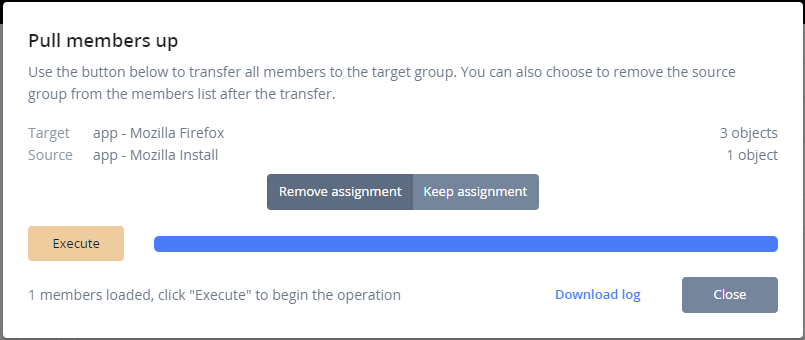
3. (オプション)ネストされたグループのメンバーを直接 RealmJoin の管理対象グループに取り込みます。この設定により、ユーザーは直接 RealmJoin の管理対象グループへ移行され、必要に応じてネストされたグループが Managed グループから削除されます。
1. 該当するグループを選択 -> その他 -> 「メンバーを引き上げる」。
2. 次を選択します  対象のネストされたグループで
3. 「割り当てを削除」を選択するとネストされたグループを削除し、「割り当てを保持」を選択するとネストされたグループを RealmJoin の管理対象グループに残します
4. 操作を開始するには \[実行] をクリックします
---
# Agent Instructions
This documentation is published with GitBook. GitBook is the documentation platform designed so that both humans and AI agents can read, navigate, and reason over technical content effectively. Learn more at gitbook.com.
## Querying This Documentation
If you need additional information that is not directly available in this page, you can query the documentation by asking a question.
Perform an HTTP GET request on the following URL with the `ask` and `goal` query parameters:
```
GET https://docs.realmjoin.com/ja/apurikshon/packages/package-store/package-migration.md?ask=&goal=
```
`ask` is the immediate question: it should be specific, self-contained, and written in natural language.
`goal` is what the user is ultimately trying to achieve, the reason they need the answer. Sharing it helps GitBook give you a better, more relevant answer. A goal is most helpful when it describes the outcome the user wants rather than restating the question. For example, with `ask=how do I create an API token`, a goal like `automate deployments from our CI pipeline` lets GitBook tailor the answer to that use case.
The response will contain a direct answer to the question and relevant excerpts and sources from the documentation.
Use this mechanism when the answer is not explicitly present in the current page, you need clarification or additional context, or you want to retrieve related documentation sections.