> For the complete documentation index, see [llms.txt](https://docs.realmjoin.com/llms.txt). Markdown versions of documentation pages are available by appending `.md` to page URLs; this page is available as [Markdown](https://docs.realmjoin.com/es/administracion-de-aplicaciones/packages/package-store/package-migration.md).
# Migración de paquetes
Los paquetes pueden migrarse a "Managed" si antes se implementaron como "Basic".
{% hint style="warning" %}
La migración de paquetes solo está disponible para **RealmJoin** paquetes
{% endhint %}
## Identificación de paquetes
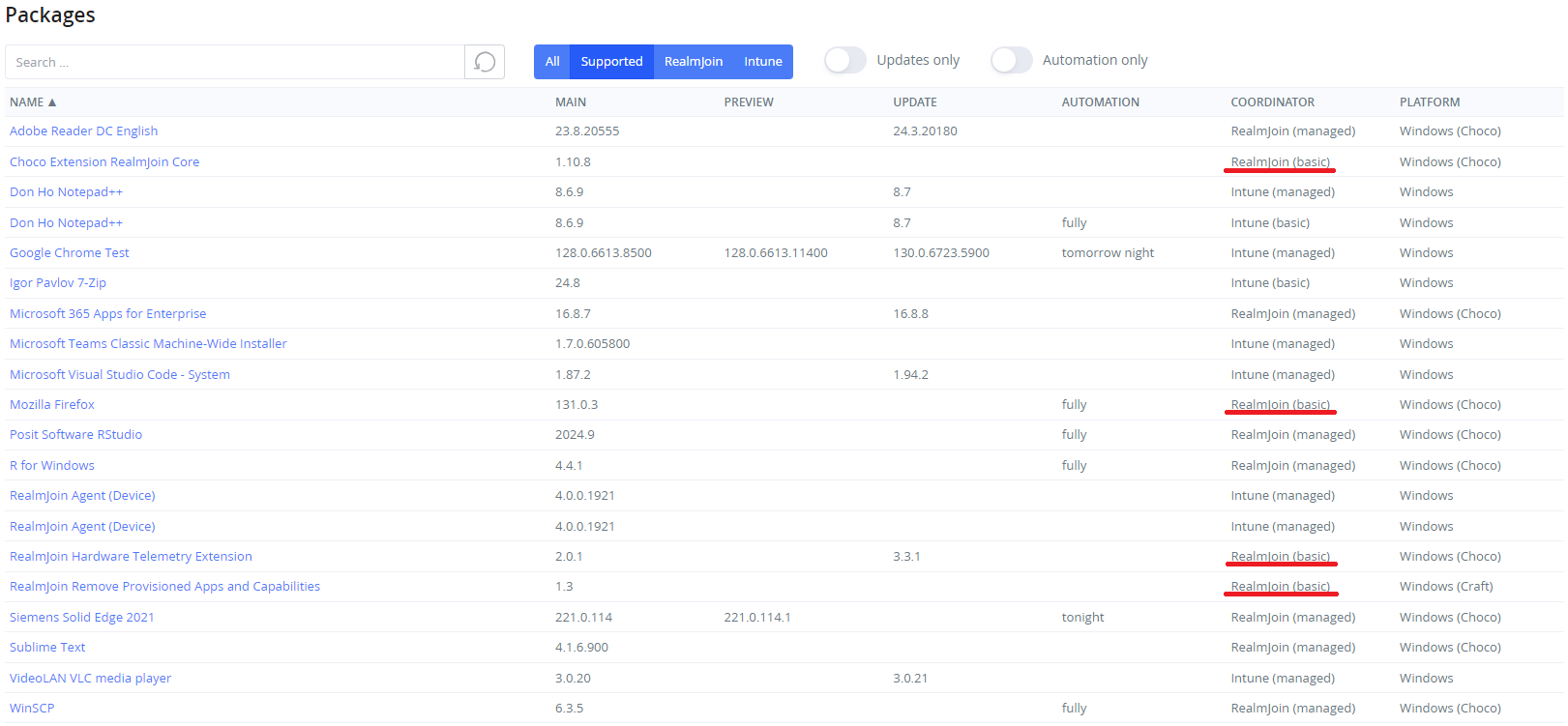
Actualmente, solo los paquetes de RealmJoin pueden migrarse de una implementación Basic a Managed. Esto se puede identificar en la tabla Packages:
## Migración
1. Seleccione un paquete Basic de RealmJoin
2. En Asignaciones de grupo, seleccione Más -> Convertir en aplicación administrada (este proceso se realiza inmediatamente).
* Los grupos antiguos se anidan en los nuevos grupos administrados de RealmJoin. La configuración realizada en los grupos Basic será adoptada por los grupos administrados.
Antes de la migración
Después de la migración
* Los usuarios se agregan al grupo más relevante
Antes de la migración
Después de la migración
3. (Opcional) Extraiga los miembros de los grupos anidados directamente a los grupos administrados de RealmJoin. Esta configuración migra a los usuarios directamente al grupo administrado de RealmJoin y, opcionalmente, elimina el grupo anidado del grupo administrado.
1. Seleccione el grupo correspondiente -> Más -> "Extraer miembros".
2. Seleccione la  en el grupo anidado deseado
3. Elija "Eliminar asignación" para quitar el grupo anidado o "Conservar asignación" para mantener el grupo anidado en el grupo administrado de RealmJoin
4. Haga clic en Ejecutar para iniciar la operación
---
# Agent Instructions
This documentation is published with GitBook. GitBook is the documentation platform designed so that both humans and AI agents can read, navigate, and reason over technical content effectively. Learn more at gitbook.com.
## Querying This Documentation
If you need additional information that is not directly available in this page, you can query the documentation by asking a question.
Perform an HTTP GET request on the following URL with the `ask` and `goal` query parameters:
```
GET https://docs.realmjoin.com/es/administracion-de-aplicaciones/packages/package-store/package-migration.md?ask=&goal=
```
`ask` is the immediate question: it should be specific, self-contained, and written in natural language.
`goal` is what the user is ultimately trying to achieve, the reason they need the answer. Sharing it helps GitBook give you a better, more relevant answer. A goal is most helpful when it describes the outcome the user wants rather than restating the question. For example, with `ask=how do I create an API token`, a goal like `automate deployments from our CI pipeline` lets GitBook tailor the answer to that use case.
The response will contain a direct answer to the question and relevant excerpts and sources from the documentation.
Use this mechanism when the answer is not explicitly present in the current page, you need clarification or additional context, or you want to retrieve related documentation sections.