> For the complete documentation index, see [llms.txt](https://docs.realmjoin.com/llms.txt). Markdown versions of documentation pages are available by appending `.md` to page URLs; this page is available as [Markdown](https://docs.realmjoin.com/analyze-and-export/data-export.md).
# Data Export
Export Data of queried tables to perform filtering and analysis with your tenant data
RealmJoin introduces an export functionality which enables you to work with your tenant data outside of the portal.
## General Exporting
You can query the User, Group, Device and Package tables for your requested data and generate an OpenXML file containing the queried data with all columns.
Simply go to a table, perform your search and press the download button in the top right corner:
## Export Use Case: Software Report
You can query for specific software and packages in the [software report](https://portal.realmjoin.com/softwarereport/all) and get a resulting table of users or devices with the different installed versions.
Clicking on an entry in the "Devices" or "Users" column will result in a pre-filtered table-view which can be easily exported via the export button shown in the screenshot above.
This enables you to do evaluations on installed software and identify Devices and Users with outdated versions.
Overview of installed versions of Git for Windows
{% hint style="info" %}
Find more information about Software Reporting with RealmJoin in the [Software Reporting Section](/analyze-and-export/software-reporting.md).
{% endhint %}
## Predefined Dataset Exports
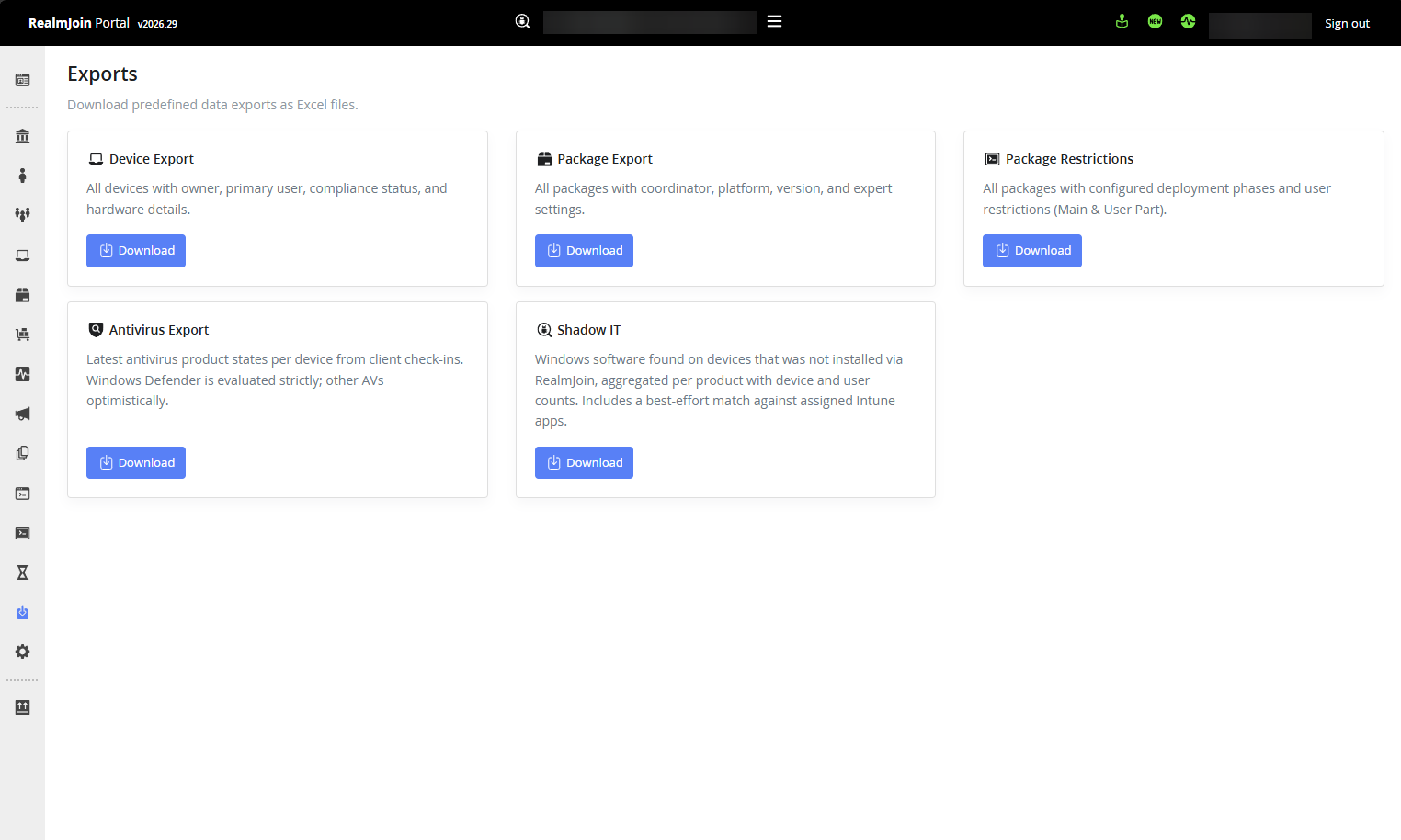
In addition to ad-hoc table exports, RealmJoin Portal offers one-click Excel (.xlsx) downloads of key datasets for reporting and auditing. You will find the **General Data Export** section in the portal navigation. Each export is available as a one-click download.
Export section in the RealmJoin portal
### Available Exports
#### Device Export
Exports all devices in your environment with the following columns:
| Column | Description |
| --------------------- | --------------------------------------- |
| Device Name | Name of the device |
| Owner | Device owner |
| Owner UPN | Owner's User Principal Name |
| Primary User (RJ) | Primary user as determined by RealmJoin |
| Operating System | Installed operating system |
| Manufacturer | Hardware manufacturer |
| Model | Device model |
| CPU | Processor name |
| CPU Speed (GHz) | Processor clock speed |
| RAM (GB) | Installed memory |
| Disk (GB) | Disk capacity |
| Last Seen | Timestamp of last activity |
| Compliant | Compliance state |
| Enabled | Whether the device is enabled |
| RJ Version | Installed RealmJoin client version |
| Office Version | Installed Microsoft Office version |
| Office Update Channel | Configured Office update channel |
| First Seen | Timestamp of first appearance |
| Serial Number | Hardware serial number |
| Intune Last Sync | Last sync timestamp with Intune |
#### Package Export
Exports all subscribed packages with the following columns:
| Column | Description |
| ------------------- | ------------------------------------------- |
| Package Name | Display name of the package |
| Package ID | Unique package identifier |
| Coordinator | Assigned coordinator |
| Platform | Target platform |
| Version | Currently deployed version |
| Auto Upgrade | Whether automatic upgrades are enabled |
| Allow Reinstall | Whether reinstallation is allowed |
| Group Name | App category |
| Depends On | Dependency on other packages, e.g. runtimes |
| Auto Deploy Main | Auto-deployment state for the main ring |
| Auto Deploy Preview | Auto-deployment state for the preview ring |
| Latest Version | Most recent available version |
| Technical Owners | Assigned technical owners |
| Maintained | Whether the package is actively maintained |
#### Package Restrictions
Exports all packages with their expert settings (restriction configuration) across deployment rings:
| Column | Description |
| --------------- | ----------------------------------------------------- |
| Package Name | Display name of the package |
| Package ID | Unique package identifier |
| Coordinator | Assigned coordinator |
| Platform | Target platform |
| Main: Normal | Main script – normal restriction |
| Main: Initial | Main script – initial restriction |
| Main: Manual | Main script – manual restriction |
| Main: Logon | Main script – logon restriction |
| Main: Primary | Main script – primary restriction |
| Main: Secondary | Main script – secondary restriction |
| Has User Part | Whether the package includes a user-context component |
| User: Normal | User script – normal restriction |
| User: Initial | User script – initial restriction |
| User: Manual | User script – manual restriction |
| User: Logon | User script – logon restriction |
| User: Primary | User script – primary restriction |
| User: Secondary | User script – secondary restriction |
#### Antivirus Export
Exports antivirus status information across all devices:
| Column | Description |
| ------------------- | ------------------------------------------------------ |
| OS | Operating system |
| OS Version | Operating system version |
| Device Name | Name of the device |
| Client ID | RealmJoin client identifier |
| AAD Device ID | Entra ID (Azure AD) device identifier |
| Product Name | Antivirus product name |
| Is Defender | Whether the product is Microsoft Defender |
| Evaluated State | RealmJoin's evaluated protection state |
| Raw State | Raw antivirus state as reported |
| Last Signed-in User | Last user who signed in on the device |
| User ID | User identifier |
| User Is Local Admin | Whether the last signed-in user has local admin rights |
| Last Seen | Timestamp of last activity |
| RJ Version | Installed RealmJoin agent version |
#### Shadow IT
Exports Windows software found on devices that was **not** installed via RealmJoin, aggregated per product with device and user counts. It also includes a best-effort match against your assigned Intune apps, to help you spot software that could be brought under management:
| Column | Description |
| ---------------- | ---------------------------------------------------------------------------- |
| Type | Software type / source (e.g. `Windows: Appx`) |
| Name | Product name |
| Publisher | Publisher, taken from the software's signing certificate subject |
| Known as | Normalized / friendly product name, when RealmJoin can map one |
| Versions | Number of distinct versions found across all devices |
| Devices | Number of devices the product was found on |
| Users | Number of users associated with those devices |
| Installations | Total number of installations found |
| Intune App Match | Whether the product could be matched to an assigned Intune app (best-effort) |
#### Package Usage
Exports the last use of **one** package per device, taken from each device's most recent software report. This is the standard way to find unused software for license optimisation. Devices that never used the package come first, followed by the oldest use first.
**Usage:** pick the software through the typeahead (e.g. `chrome`). The portal immediately reports whether usage data can be determined for that package:
* *Usage matching available: last usage and usage count can be reported.*
* *No usage matching for this package: "Last Used" and "Usage Count" will stay empty.* – the export still lists the devices with the package installed, but without usage data.
**Mode:** the dropdown decides which installations are considered:
* **RealmJoin installs** – only installations RealmJoin performed itself. A clean cut on the managed base: the devices where RealmJoin deployed this package.
* **Win32 inventory** – everything in Programs and Features that the software pattern recognises, including copies installed outside RealmJoin. Choose this for software with its own updater (browsers, Teams, Zoom): the inventory reflects the version actually on the device, while the RealmJoin record still shows the version RealmJoin installed.
**Unused ≥ N days:** only devices that have not used the package for at least that many days – or never – are listed. Leave the field empty to list all devices. The devices hidden by the cutoff are counted on a separate **Summary** sheet in the workbook, together with the package, mode, cutoff date and the number of devices with software report data.
{% hint style="info" %}
Usage data comes from the RealmJoin Agent. Without the agent, *Last Used* and *Usage Count* stay empty. Usage is tracked by matching program executions to the package's software pattern, so it can be incomplete for packages whose executables are not (yet) known to the pattern.
{% endhint %}
| Column | Description |
| ---------------- | ------------------------------------------------------------------------------------ |
| Device Name | Name of the device |
| Device ID | Entra ID (Azure AD) device identifier |
| Operating System | Installed operating system |
| Software | Software name(s) as recognised by the software pattern |
| Package ID | Unique package identifier |
| Type | Installation source(s), e.g. `Craft`, `Choco`, `IntuneWin` or `Windows: Programs` |
| Version | Installed version(s) found on the device |
| Last Used | Timestamp of the most recent use across all users of the device; empty if never used |
| Usage Count | Number of recorded executions, summed over all users of the device |
| Users | Number of distinct users on the device with this package in their report |
| Device Last Seen | Timestamp of the device's last activity |
| Compliant | Compliance state |
| Enabled | Whether the device is enabled |
{% hint style="info" %}
The data in these exports is sourced from the RealmJoin agent and Intune and combined into the individual reports. Future iterations may include additional information; changes will be posted in the changelog and reflected in this documentation.
{% endhint %}
---
# Agent Instructions
This documentation is published with GitBook. GitBook is the documentation platform designed so that both humans and AI agents can read, navigate, and reason over technical content effectively. Learn more at gitbook.com.
## Querying This Documentation
If you need additional information that is not directly available in this page, you can query the documentation by asking a question.
Perform an HTTP GET request on the following URL with the `ask` and `goal` query parameters:
```
GET https://docs.realmjoin.com/analyze-and-export/data-export.md?ask=&goal=
```
`ask` is the immediate question: it should be specific, self-contained, and written in natural language.
`goal` is what the user is ultimately trying to achieve, the reason they need the answer. Sharing it helps GitBook give you a better, more relevant answer. A goal is most helpful when it describes the outcome the user wants rather than restating the question. For example, with `ask=how do I create an API token`, a goal like `automate deployments from our CI pipeline` lets GitBook tailor the answer to that use case.
The response will contain a direct answer to the question and relevant excerpts and sources from the documentation.
Use this mechanism when the answer is not explicitly present in the current page, you need clarification or additional context, or you want to retrieve related documentation sections.